In the realm of digital art and interactive installations, TouchDesigner stands out as a powerful visual programming environment. Developed by Derivative, it allows artists and creators to build stunning audiovisual experiences. As a platform that bridges the gap between art and technology, TouchDesigner has become increasingly popular among artists, musicians, and designers. This article delves into the essentials of getting started with TouchDesigner, offering insights and guidance from the perspective of Visual Alchemist, a community dedicated to exploring the intersections of technology and creativity.
Understanding TouchDesigner
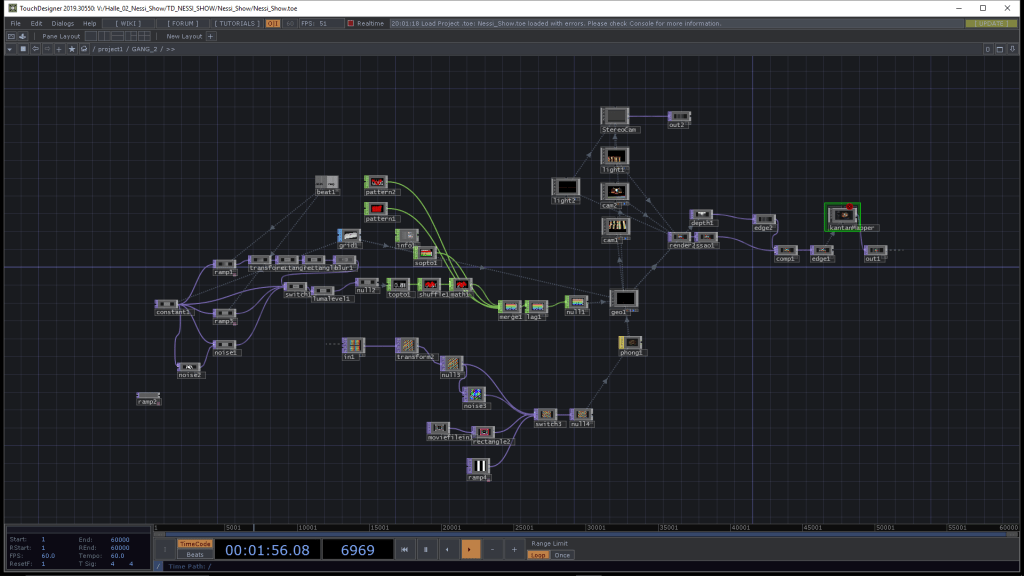
TouchDesigner is a node-based visual programming language that enables users to create real-time interactive multimedia content. It is particularly favored for its flexibility, allowing for the integration of video, audio, and various input devices. Whether you are interested in creating immersive installations, live performances, or interactive art, TouchDesigner provides the tools necessary to bring your vision to life.
Key Features of TouchDesigner
- Node-Based Interface: TouchDesigner’s node-based interface allows users to create complex projects without writing extensive code. Nodes can be connected in various ways to process and manipulate data, making it accessible for artists and designers.
- Real-Time Rendering: One of the standout features of TouchDesigner is its ability to render visuals in real-time. This is particularly beneficial for live performances and installations where immediate feedback and interaction are crucial.
- Integration Capabilities: TouchDesigner excels in integrating with other software and hardware. It supports a wide range of input devices, including MIDI controllers, webcams, sensors, and more, allowing for versatile interactive installations.
- Extensive Documentation and Community Support: Derivative offers comprehensive documentation and a supportive community. Forums, tutorials, and workshops provide valuable resources for both beginners and advanced users.
The Journey of Learning TouchDesigner
Learning TouchDesigner is a journey filled with creativity and discovery. The platform’s flexibility and depth make it an ideal tool for artists who want to experiment and push the boundaries of digital art.
Common Challenges for Beginners
- Overwhelming Interface: The TouchDesigner interface can be overwhelming for beginners. Starting with simple projects helps to gradually become familiar with the layout and functionality.
- Understanding Nodes: Nodes are fundamental to TouchDesigner, but understanding how they work and interact can be challenging. Beginners should focus on learning the basics of node connections and data flow.
- Real-Time Debugging: Debugging in real-time can be tricky, especially for complex projects. Developing a systematic approach to troubleshooting by isolating and testing individual components is essential.
Key Components of the Beginner Course
A comprehensive beginner course in TouchDesigner typically covers essential topics such as:
Interface Navigation
Understanding the layout and functionality of TouchDesigner’s interface is crucial for an effective workflow. Users are guided through the various panels and tools available.
Basic Programming Concepts
The course introduces fundamental programming concepts, making it easier for those with little to no coding experience to grasp the basics. Concepts such as variables, loops, and conditionals are explained in the context of TouchDesigner.
Creating Simple Projects
Learners are encouraged to create simple projects that reinforce their understanding of the software. Step-by-step instructions help users build confidence.
Audio-Visual Integration
One of the standout features of TouchDesigner is its ability to synchronize audio and visual elements. Tutorials often focus on this integration, making it particularly appealing to musicians and audio artists.
Advanced Features and Capabilities
As learners progress, they can explore more advanced features of TouchDesigner. These include:
Python Scripting
TouchDesigner supports Python scripting, allowing for more complex and dynamic projects. Learning Python can significantly enhance a user’s ability to create custom functionality and automate tasks.
Shader Programming
Shaders are used to create advanced visual effects. TouchDesigner supports GLSL shaders, which can be used to create stunning real-time graphics. While shaders require a more advanced understanding of programming, they offer limitless creative possibilities.
Networking
TouchDesigner can communicate with other software and devices over networks. This allows for the creation of distributed systems, where multiple instances of TouchDesigner can work together to create large-scale installations.
Data Visualization
TouchDesigner is increasingly being used for data visualization. It can process and display data from various sources, making it a powerful tool for creating interactive data-driven art.
The Importance of Community and Resources
Engaging with the TouchDesigner community is invaluable for learners at all levels. Forums, documentation, and other resources available to TouchDesigner users are crucial for accelerating understanding and overcoming obstacles.
Key Community Resources
- Derivative Forum: The official TouchDesigner forum is a valuable resource for asking questions, sharing projects, and learning from other users.
- YouTube Channels: Numerous channels offer tutorials, project walkthroughs, and tips for using TouchDesigner.
- Workshops and Meetups: Attending workshops and meetups can provide hands-on learning experiences and opportunities to network with other TouchDesigner users.
- Documentation and Wiki: Derivative’s official documentation and wiki are comprehensive resources for learning about TouchDesigner’s features and capabilities.
Tips for Success
For those embarking on their TouchDesigner journey, here are several key pieces of advice:
Experiment Freely
Don’t hesitate to experiment with different techniques and concepts. The beauty of TouchDesigner lies in its flexibility, allowing you to explore various creative avenues.
Add Your Style
While following tutorials is beneficial, adding your personal touch to projects enhances the learning experience. Try to incorporate unique elements that reflect your artistic vision.
Stay Curious
The world of digital art is ever-evolving. Maintain a sense of curiosity and continue to explore new ideas, techniques, and trends within the TouchDesigner community.
Consistent Practice
Like any skill, mastering TouchDesigner requires consistent practice. Set aside regular time to work on projects and experiment with new features.
Seek Feedback
Sharing your work and seeking feedback from the community can provide valuable insights and help you improve. Constructive criticism can be a powerful tool for growth.
TouchDesigner in Action: Real-World Applications
TouchDesigner is used in a wide range of applications, from art installations to commercial projects. Here are a few examples of how TouchDesigner is being used in the real world:
Interactive Art Installations
Artists use TouchDesigner to create interactive installations that respond to audience input. These installations often use sensors, cameras, and other input devices to create immersive experiences.
Live Performances
Musicians and performers use TouchDesigner to create real-time visuals that accompany their performances. This can include everything from simple visualizations to complex interactive graphics.
Architectural Projections
TouchDesigner is used in architectural projection mapping, where visuals are projected onto buildings and other structures. This can transform ordinary surfaces into dynamic, interactive displays.
Commercial Installations
Brands and companies use TouchDesigner for commercial installations, such as interactive kiosks and digital signage. These installations often combine visuals, touchscreens, and other interactive elements to engage customers.
Data-Driven Art
Artists use TouchDesigner to create data-driven art, where data is used to generate visuals. This can include everything from visualizing real-time data streams to creating art based on historical data sets.
Future Trends and Developments
TouchDesigner continues to evolve, with new features and capabilities being added regularly. Here are a few trends and developments to watch for:
Integration with Emerging Technologies
TouchDesigner is increasingly being integrated with emerging technologies such as augmented reality (AR) and virtual reality (VR). This allows for the creation of immersive experiences that blend the physical and digital worlds.
Improved Performance and Scalability
As hardware continues to improve, TouchDesigner is becoming more powerful and scalable. This allows for the creation of larger and more complex projects, such as multi-channel installations and large-scale events.
Enhanced Collaboration Tools
New tools and features are being developed to support collaboration between multiple users. This makes it easier for teams to work together on projects and share resources.
AI and Machine Learning
TouchDesigner is beginning to incorporate AI and machine learning capabilities. This opens up new possibilities for creating intelligent and adaptive installations that can respond to their environment and audience.
Conclusion
TouchDesigner is a remarkable tool that empowers artists to create captivating audiovisual experiences. By embracing experimentation, engaging with the community, and infusing personal style into projects, aspiring digital artists can unlock the full potential of TouchDesigner. Whether you aim to create interactive installations, live performances, or stunning visual art, the possibilities are endless in this dynamic environment. As TouchDesigner continues to evolve and integrate with emerging technologies, it will remain at the forefront of digital art and interactive media, providing artists with the tools they need to push the boundaries of creativity.
 Visual Alchemist
Leave a comment