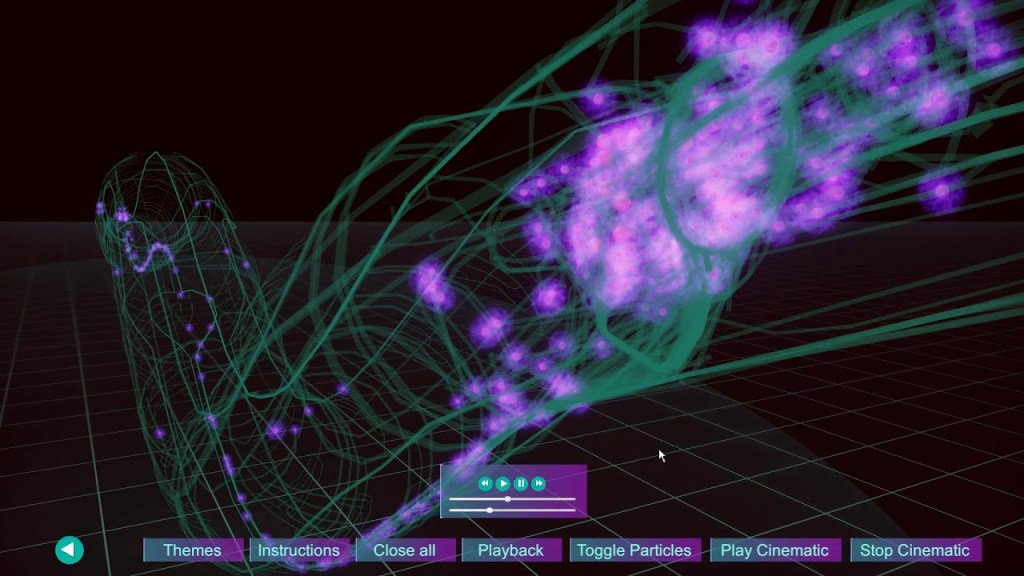
Unity, a popular game development platform, is also a powerful tool for creating generative art. Known for its robust features and real-time rendering capabilities, Unity allows artists to develop complex generative systems with interactive and immersive experiences. This blog explores how Unity is used in generative art projects, covering its history, usage, notable artists, and beginner tutorials.
History of Unity in Generative Art
Origins and Development
Unity was first released in 2005 by Unity Technologies as a development environment for creating video games. Over the years, it has evolved into a versatile platform for real-time 3D content, extending its applications beyond gaming to fields such as architecture, simulation, and art. The introduction of Unity’s Asset Store and its strong community support have significantly contributed to its widespread adoption.
Adoption in Generative Art
Unity’s adoption in generative art began as artists and developers recognized its potential for creating interactive and visually rich experiences. Its robust toolset, including a powerful rendering engine, scripting capabilities, and extensive asset libraries, makes it an ideal platform for generative art.
Impact on the Art Community
Unity has had a significant impact on the digital art community, enabling artists to create interactive installations, immersive environments, and real-time visualizations. Its flexibility and accessibility have fostered a community of creative coders and artists who continually push the boundaries of what is possible with generative art.
Usage of Unity in Generative Art
Core Features and Tools
Unity offers several features that are advantageous for generative art:
- Real-Time Rendering: Unity’s powerful rendering engine enables the creation of high-quality real-time visuals.
- Scripting: C# scripting allows for detailed control over generative processes and interactive elements.
- Asset Store: A vast library of assets, plugins, and tools that can be used to enhance generative art projects.
- Shader Graph: A visual tool for creating complex shaders without writing code, ideal for generative visuals.
Creating Interactive Art
Unity excels in creating interactive generative art. Artists can use Unity to develop systems that respond to user inputs, environmental data, or procedural algorithms, resulting in dynamic and engaging experiences. The engine’s support for various input devices and VR/AR integration further enhances its capabilities for interactive art.
Integration with External Data
Unity can integrate with external data sources, such as APIs, sensors, and databases, allowing artists to create data-driven generative art. This capability is particularly useful for creating real-time visualizations and installations that react to live data.
Famous Artists Using Unity
Jonathan Yomayuza
Jonathan Yomayuza, an artist and developer, uses Unity to create interactive installations and generative art. His work often explores the intersection of technology and nature, using Unity’s capabilities to create immersive and dynamic experiences.
Dmitry Paranyushkin
Dmitry Paranyushkin is known for his generative art projects that utilize Unity’s real-time rendering and interactive features. His works often involve complex procedural algorithms and real-time data integration, demonstrating the potential of Unity in generative art.
Studio ANF
Studio ANF is a collective that frequently uses Unity for their generative art installations. Their projects include large-scale interactive installations that engage audiences with real-time visuals and immersive environments.
Pros and Cons of Using Unity in Generative Art
Pros
- Real-Time Rendering: Unity’s powerful rendering engine enables high-quality real-time visuals, essential for immersive generative art.
- Flexibility: The platform supports various input devices, VR/AR integration, and extensive scripting capabilities.
- Community and Resources: Unity has a strong community and a wealth of resources, including tutorials, documentation, and asset libraries.
Cons
- Learning Curve: Mastering Unity’s extensive toolset and scripting can take time, especially for those new to game development or programming.
- Performance Requirements: Real-time rendering and complex interactions can be resource-intensive, requiring powerful hardware.
- Commercial Licensing: While Unity offers a free version, some features and assets require a commercial license.
Beginner Project Tutorials
1. Procedural Terrain Generation (Unity) Learn the basics of procedural terrain generation in Unity. This tutorial covers using C# scripting to create dynamic terrains. Watch the tutorial here.
2. Interactive Particle Systems (Unity) Create an interactive particle system that responds to user inputs. This project introduces particle dynamics and interaction in Unity. Watch the tutorial here.
3. Real-Time Data Visualization (Unity) Develop a real-time data visualization that reacts to live data inputs. This tutorial covers integrating external data sources and visualizing data in Unity. Watch the tutorial here.
Unity is a versatile and powerful platform for generative art, offering robust real-time rendering, extensive scripting capabilities, and a wealth of resources. Its ability to create interactive and immersive experiences makes it an excellent choice for artists looking to explore the possibilities of generative art. Despite its learning curve and performance requirements, Unity’s potential for innovation in generative art is substantial.
TL;DR
- Unity is a popular platform for generative art, known for its real-time rendering and interactive capabilities.
- Key features include real-time rendering, C# scripting, extensive asset libraries, and Shader Graph.
- Notable artists using Unity include Jonathan Yomayuza, Dmitry Paranyushkin, and Studio ANF.
- Pros include real-time rendering, flexibility, and strong community support, while cons involve a learning curve, performance requirements, and commercial licensing.
- Beginner projects like Procedural Terrain Generation, Interactive Particle Systems, and Real-Time Data Visualization are excellent starting points.
FAQs
- What is generative art? Generative art involves creating artworks using algorithms or systems that generate outputs based on predefined rules.
- Why use Unity for generative art? Unity offers real-time rendering, extensive scripting capabilities, and a wealth of resources, making it ideal for generative art.
- What are some popular features of Unity? Popular features include real-time rendering, C# scripting, asset libraries, and Shader Graph.
- Can beginners use Unity for generative art? Yes, Unity provides many resources and tutorials, though mastering its extensive toolset can take time.
- What are some common beginner projects for Unity generative art? Projects like Procedural Terrain Generation, Interactive Particle Systems, and Real-Time Data Visualization are popular starting points.
- Who are some notable artists using Unity in generative art? Notable artists include Jonathan Yomayuza, Dmitry Paranyushkin, and Studio ANF.
- What are the benefits of using Unity for generative art? Benefits include real-time rendering, flexibility, and strong community support.
- Are there any performance limitations with Unity in generative art? Real-time rendering and complex interactions can be resource-intensive, requiring powerful hardware.
- How does Unity handle interactivity in generative art? Unity excels in creating interactive systems that respond to real-time inputs, making it ideal for immersive experiences.
- What tools are needed to start with Unity generative art? Tools include the Unity software, a code editor, and tutorials for learning the basics.
- Can Unity be integrated with other technologies for generative art? Yes, Unity can integrate with various external data sources, VR/AR devices, and other software.
- What are some educational resources for learning Unity generative art? Resources include online tutorials, Unity’s documentation, and community forums.
- Is Unity suitable for creating professional generative art? Yes, many professional artists use Unity for its versatility and real-time processing capabilities.
- How do artists share their Unity generative art? Artists can share their work through live performances, installations, online platforms, and social media.
- What are some advanced techniques in Unity generative art? Advanced techniques include procedural generation, real-time data visualization, and integrating VR/AR for immersive experiences.
 Visual Alchemist